How customers agree to appointment texts
What this page is.
A grooming shop that uses GroomCounter may send its customers text messages about their appointments. This page shows exactly how a customer's agreement is collected and recorded, for the customer, the shop and the carriers that review the program. The program itself is described in the SMS terms.
The disclosure shown to staff and read to the customer.
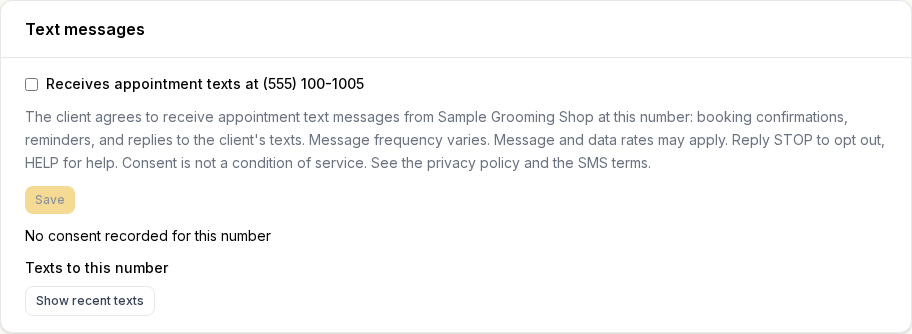
When a customer agrees, the shop's staff member checks one box on the customer's record. This text sits beside it, word for word:
The client agrees to receive appointment text messages from [shop name] at this number: booking confirmations, reminders, and replies to the client's texts. Message frequency varies. Message and data rates may apply. Reply STOP to opt out, HELP for help. Consent is not a condition of service. See the privacy policy and the SMS terms.
Four ways a customer agrees.
- In person at the shop: the staff member asks, the customer says yes, the staff member checks the box and records "in person".
- On the phone with the shop: the same, recorded "on the phone".
- On a call with the shop's automated phone receptionist, after booking: the receptionist asks "Want a text reminder at this number?" and records a yes with the call's reference.
- On the shop's online booking page, when booking: the customer ticks a box, unticked until they do, beside these words, and the agreement is recorded "online booking page" with the version of the words shown: "Text me about my appointments with [shop name] at this number: booking confirmations, reminders, and replies to my texts. Message frequency varies. Message and data rates may apply. Reply STOP to opt out, HELP for help. Consent is not a condition of booking. See the privacy policy and the SMS terms."
What staff say.
"Would you like text reminders before your appointments? It's a couple of messages per visit, standard rates apply, and you can reply STOP any time."
What GroomCounter records.
Who recorded the agreement, how the customer agreed, the version of the disclosure shown, and the time. Each later change, including an opt-out by replying STOP or a staff member unchecking the box, is a new record; none is deleted.
The welcome message.
The moment agreement is recorded, the customer receives one text: "{shop name}: You're signed up for appointment texts. Msg frequency varies. Msg & data rates may apply. Reply STOP to opt out, HELP for help."
Opting out.
Reply STOP to any message, or ask the shop. The shop can also uncheck the box on the record.
The form.
The screenshot below is the card on a customer's record, as staff see it before the box is checked.